Underwrite a DealUpdated Sep 13, 2026Investors underwriting mobile home parks
A mobile home park earns its income from pads, not apartments — and often from two different businesses at once: renting the land under someone else's home, and renting a home the park itself owns. Mogul Deal Evaluator's Mobile Home Park workspace models both, keeps them separate, and then runs the same detailed engine used for the rest of the platform: expenses, debt, projections, exit, and returns.
Start the analysis
Choose Mobile Home Park in the asset picker — from New Deal or the New Underwriting page. The guided flow then offers the same three ways in as the other assets:
Upload documents — an offering memorandum, a pad rent roll, or a T12. Document import is a higher-tier plan capability; the card shows the lock when your plan doesn't include it.
Enter manually — park name, address, valuation, and Developed pads. Everything else is built in the workspace.
Paste a listing link — pulls the address and asking price into the deal.
Prefer to look before you build? The read-only mobile home park sample deal is a complete park underwrite — inventory, leasing plan, capital budgets, diligence notes and all. See Sample Deals.
How the park workspace is organized
A progress card tracks your required inputs, and the stages unlock in order. Parks use the same spine as the rest of the detailed workspace, with park wording where the work differs:
Deal Setup — park identity, developed pads, valuation, and the optional Park operations & due diligence panel (water, sewer, electric, roads, approvals, and your sources).
Park Income — the Pad & Home Income card (inventory and monthly rents), the optional Leasing & infill plan, Other Income, and Occupancy & Collection Losses.
Park Operating Expenses — your expense lines, plus the optional Infill operating costs run rate.
Acquisition & Debt — purchase, loan terms, and closing costs.
Infrastructure & Capital Projects — the Park capital budgets card and itemized capital rows for roads, utility systems, pad development, and park-owned homes.
Growth & Exit Assumptions, Sensitivity Analysis, and Syndication round out the advanced band, which requires the advanced-underwriting capability on your plan.
Where the park-specific controls live
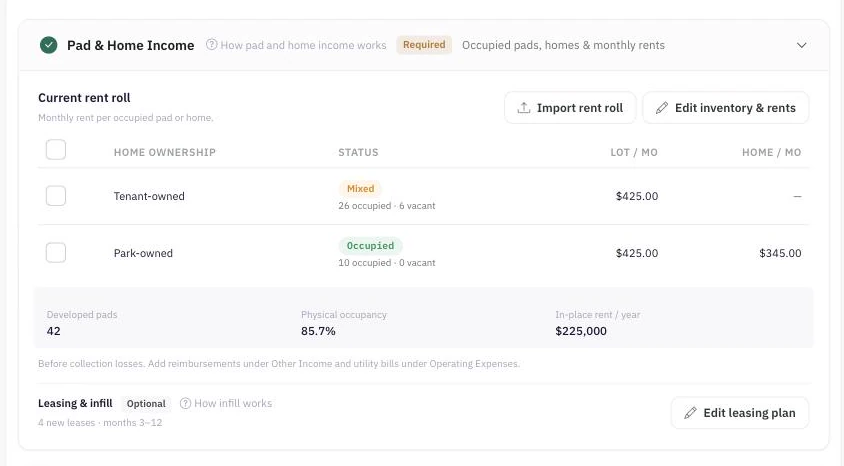
One row per ownership group — tenant-owned pads earn lot rent only; park-owned homes earn a lot portion plus a home-only portion.
Park inputs are deliberately placed inside the sections they belong to rather than in one giant park form — so the numbers land where the rest of the underwrite expects them:
Inventory and current rents → Park Income → Edit inventory & rents. See Pad & Home Income.
Future leases and delivery timing → Park Income → Edit leasing plan.
Added running costs at completed infill → Park Operating Expenses → Infill operating costs.
Infill and infrastructure funding → Infrastructure & Capital Projects → Park capital budgets. See Infill, Infrastructure & Park Capital.
Utilities, approvals and source notes → Deal Setup → Review park facts.
Getting the numbers in
You can type the inventory into Edit inventory & rents, or import a pad rent roll from the Park Income card's Import rent roll button. A park rent roll import is review-first and, on approval, replaces this scenario's Pad & Home Income — see Import a Rent Roll for exactly what is replaced and what is preserved.
A T12 fills other income and operating expenses for a park. Its rental totals are reference-only — they never replace Pad & Home Income, because a single annual rent figure cannot say how many pads are tenant-owned, how many homes the park owns, or which pads are empty. Rental income comes from the inventory or a pad rent roll.
Reading the results
The Live Analysis rail recalculates as you save: cash flow, returns, a DSCR gauge, and an "Against your targets" card scored against your own Buying Targets. The Maximum purchase price card works on parks too, solving for the highest price that still clears the targets you select. Purchase Price Sensitivity and Sensitivity Analysis both support parks, so you can stress exit cap, rent growth, vacancy, interest rate and price before a lender does it for you.
Scenarios behave exactly as they do elsewhere: every input belongs to the selected scenario, cloning keeps your base case clean, and the park document — inventory, leasing plan, budgets and notes — is copied with the clone.
Conventions worth knowing before you present
In-place occupancy is derived, not typed. Physical occupancy comes from your pad inventory, so the occupancy field is read-only on a park. Change the inventory to change the occupancy.
Projection vacancy is an additional collection loss on scheduled occupied rent — physical vacancy is already modeled by the inventory and the delivery schedule. The apartment occupancy-sync and lease-up ramp deliberately do not run on parks.
NOI excludes the asset-management fee, which is deducted below NOI — the same convention as the rest of the detailed model.
Rent growth starts in Year 2, matching the detailed engine.
What the model computes, and what you must verify
Everything above is a model of your assumptions. Mogul Deal Evaluator computes the arithmetic honestly, but it cannot confirm the facts underneath it. Before you rely on a park underwrite, verify outside the tool:
The licensed pad count, zoning, and whether infill is actually approved — a pad you may not legally rent is not inventory.
Utility ownership, capacity and metering, and who pays for what under the current leases.
Home titles and lease terms for park-owned homes, and any rent restrictions that apply.
Lender treatment. Lender sizing here uses the modeled operating NOI; how a lender treats home income, personal-property collateral, or park-owned homes is a conversation with that lender, not an output of this model.
Record what you confirmed — and what is still open — in Review park facts, so the assumptions travel with the deal.
Reports
A park's detailed report carries a Park Income & Business Plan block alongside the shared financial results — the inventory, the leasing plan, and the diligence topics you documented. The PDF export includes the same park summary.
Common mistakes to avoid
Counting undeveloped land as inventory. Potential pads are tracked separately and earn nothing until they are developed and leased.
Entering a combined home-and-lot rent as lot rent. Split it — the two portions behave differently in the model and to a lender.
Budgeting the same capital twice — once in Park capital budgets and again as a capital row.
Treating a T12's rental total as the rent roll. It is reference-only on a park.
mobile home parkMHPparkmanufactured housingpadsworkspacelot rent