Underwrite a DealUpdated Sep 3, 2026Investors testing what a price does to returns
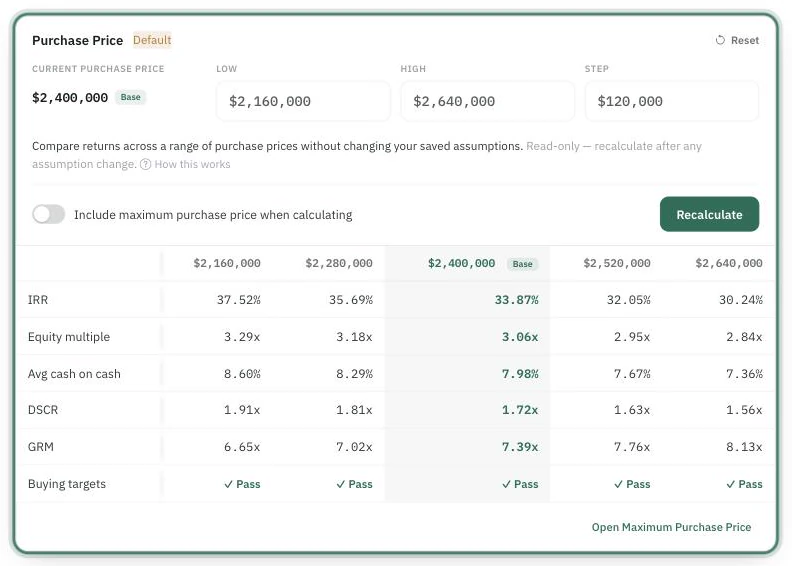
Purchase Price Sensitivity answers a different question than "what should I pay?" — it shows how your returns move as the price moves. Where Maximum Purchase Price finds one ceiling, the price ladder shows the whole slope: what each candidate price does to IRR, equity multiple, cash-on-cash, DSCR, and GRM.
Run a ladder
One row per metric, one column per price — the base column is the price the deal is actually underwritten at.
In the deal's Sensitivity Analysis section, find the Purchase Price card. It is available on multifamily, mobile home park and self-storage deals.
Set Low, High, and Step around your current price (Reset restores the defaults — roughly ±10% in 5% steps). The range must bracket your current price.
Click Calculate price sensitivity. Each column of the ladder is the full analysis re-run at that price — your base price pinned for comparison.
Read it against your targets
Beneath the metrics, a Buying targets row marks each price Pass or names the failing criterion — so the ladder doubles as a map of where your buying box ends. Watching which metric fails first as price climbs tells you what your negotiation is really about (the same "binding constraint" idea Maximum Purchase Price reports).
Fold in the ceiling
Switch on "Include maximum purchase price when calculating" and the run also performs a fresh Maximum Purchase Price goal-seek against your valid targets, marking the ceiling in the ladder. Ladder plus ceiling on one card is the fastest honest answer to "what does the market ask, what can I pay, and what happens in between?" Cross-links on the card jump both directions.
Important things to know
Results are read-only and don't persist. Only your Low/High/Step and the include-ceiling switch are saved (per scenario); the ladder itself clears on refresh — recalculate after any assumption change.
Nothing changes your saved underwriting. The ladder is exploration; your scenario's price stays untouched until you change it yourself.
Debt behavior matters: when automatic loan sizing is off, debt stays fixed across the range and price changes are absorbed by equity — so debt-driven metrics like DSCR barely move, and the card says so.
A successful run also adds the Purchase Price bar to the tornado chart, ranking price against your other assumptions by impact.
Common questions
"The ladder disappeared." — Expected: results are ephemeral. Your range is saved; recalculate.
"Every column looks the same on DSCR." — See the fixed-debt note above; that flatness is information, not a bug.
"Is the passing price the right offer?" — The ladder shows consequences, not advice. What you offer is your decision — the ladder just makes the trade-offs visible.
price sensitivityprice ladderwhat if pricesensitivity