Underwrite a DealUpdated Sep 13, 2026Users importing operating statements
A T12 (trailing-12 operating statement) is the fastest way to fill a deal's income and expenses with the property's actual history. Mogul Deal Evaluator reads the file, proposes a category for every line, and shows you a review screen — nothing touches your underwriting until you approve it.
What you can upload
Files: CSV, XLS, XLSX, PDF, ODS, or NUMBERS, up to 10 MB. Spreadsheets read most reliably; PDFs work but a clean export beats a scan.
Or paste a Google Sheets link (shared with "Anyone with the link").
Best layout: one category per row, one clean number per month column. Keep symbols and notes out of value cells, and unhide anything that matters — hidden rows aren't read.
Multi-sheet workbooks ask you which tab to use.
Import, step by step
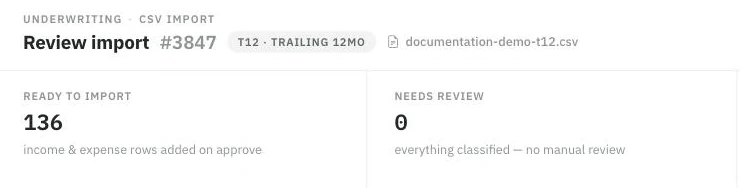
Nothing is written until you approve. The verdict strip is the first thing to read: what will import, and what still needs you.
In the deal, open Import financial document and drop in the file. Document import is a higher-tier plan capability.
The document type is detected automatically ("Detected as T12"); a Wrong type? override is always there.
Processing runs in the background, then the review screen opens: every row with its proposed category, a confidence level, and summary totals reconciled against the file's own totals.
Work the tabs — Ready to import, Needs review, Not imported — and fix anything mis-filed with the row's "Import as" control. Each row shows where its answer came from (matched automatically, remembered from your past imports, AI-reviewed, or edited by you), so you know what deserves a second look.
Click Approve & import. Only rows marked ready are written; everything else stays in the audit trail for reference.
What lands where — and what never imports
T12 rows fill other income and operating expenses. The recommended order is rent roll first (rental income and occupancy), then T12.
Never imported as line items: debt service (modeled separately in your loan), non-operating items like depreciation, and vacancy/concessions (underwriting rates you set, not history you import). If an excluded row carries real dollars, the review makes you acknowledge it before Approve unlocks — nothing is silently dropped.
Partial-year files ask you to choose: annualize to a full year or import as entered — never scaled without your say-so.
What a T12 does with rental income — by asset type
Other income and operating expenses work the same way on every asset. Rental income does not.
Multifamily — if a rent roll is all you're missing, you can opt in to import the T12's rental income as a single aggregate figure. It is a fallback, not the preferred path: an aggregate carries no unit detail and no occupancy.
Self-storage and mobile home parks — the T12's rental totals are reference-only. They never replace the storage Unit Mix or the park's Pad & Home Income, and there is no aggregate fallback to opt into. The importer says so on the upload screen.
The reason is structural, not a limitation waiting to be lifted. A storage facility's income is defined by its unit mix and a park's by its pad inventory — one annual rent total cannot say how many units are offline, how many pads are empty, or which homes the park owns. On those assets, rental income comes from the inventory itself or from a rent roll import.
Historical capital expenditure is a separate matter again: importing it as a forward budget requires the existing explicit opt-in, on every asset.
Important things to know
Extraction is assisted, not perfect — that's why the review screen exists. Low-confidence rows are flagged for a reason: a mis-filed expense changes NOI.
The modal's built-in Import guide answers layout and status questions in place while you review.
If the file can't be read cleanly, Mogul Deal Evaluator may route it for a closer look rather than guessing — you'll see the import's status rather than silent wrong numbers.
If something fails
"This doesn't look like a T12" — a T12 needs a column per month. If it's actually a rent roll, import it as one.
File can't be read — password-protected or corrupted files can't be opened; re-export as .xlsx or .csv.
Totals don't reconcile — the summed rows disagree with the file's own totals beyond tolerance; fix the mis-read rows before approving.