Pad & Home Income is where a park deal's rental income comes from. It is not a list of tenants — it is an inventory of developed pads, grouped by who owns the home standing on them, with a monthly rate for each group. Get the grouping right and the rest of the underwrite follows.
Two abbreviations run through every park document you will read:
These are different businesses with different risk, different expenses, and different lender treatment — which is why Mogul Deal Evaluator never blends them into a single "rent". The Pad & Home Income card shows them as two rows, Tenant-owned and Park-owned, each with its own occupied and vacant counts and its own Lot / mo and Home / mo rates.
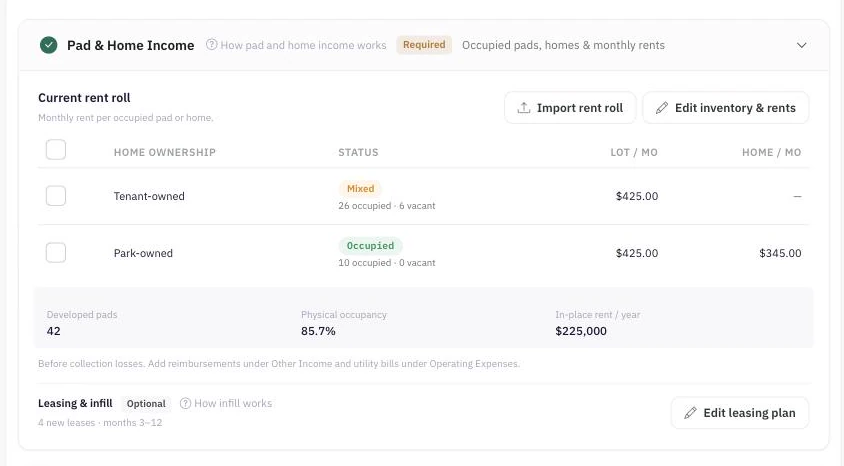
Open Edit inventory & rents. Four counts describe your developed inventory, and each developed pad belongs to exactly one of them:
Those four add up to Developed pads, the figure in the card's stats row and the basis for physical occupancy.
All park rents are monthly; the engine annualizes them once. The editor asks for three:
Each rate is a group average, so use the average in-place rent actually being collected by that group. A rate becomes required once its group has an occupied count: you cannot save occupied tenant-owned pads with no lot rent, or occupied park-owned homes without both the lot portion and the home-only portion.
Most park-owned-home leases quote one number — the resident pays a single monthly amount for the home and the pad together. The model needs it in two parts, so you have to choose an allocation and be able to say where it came from.
For an illustrative $850 combined lease, an assumed $400 lot portion leaves $450 as home-only rent. The two portions must add up to the combined rent you are modeling. Whatever basis you choose, record it under Sources & rent evidence so the number can be defended later.
Common bases for the lot portion, strongest first:
Keep the split consistent with what the rent actually covers: exclude utilities and mandatory fees from both portions — the importer applies the same rule, requiring lot plus home-only to equal the row's monthly rent net of those charges. And if the source documents genuinely do not support a split, that is a diligence item to resolve with the seller, not a number to invent.
The rates in Edit inventory & rents are your in-place rents: they describe the inventory you already have, and every occupied pad in a group earns that group's rate. Rents you expect on the leases your business plan creates live separately, in the leasing plan's New-lease rents — and they apply only to what that plan actually produces: vacant pads and homes you fill, and pads you develop.
Keeping the two apart is what stops a new-lease assumption from silently repricing occupied residents. A new-lease rate you never set starts from the matching current rate; once you enter a value, it is independent. Be clear about the limit, though: the model does not schedule turnover. There is no move-out, renewal or re-lease input, so an occupied pad never vacates and comes back at the new rate. Ordinary rent growth is the separate, supported way to escalate rents over the hold — it applies across the projection from Year 2. See Infill, Infrastructure & Park Capital.
Both appear on a park, and they answer different questions.
They differ whenever your vacant inventory is worth more or less per pad than your occupied inventory — for example, empty park-owned homes drag economic occupancy down harder than empty tenant-owned pads, because a park-owned pad's potential includes the home portion too.
Instead of typing the inventory, use Import rent roll on the Pad & Home Income card. A park rent roll needs one row per developed pad, and each row must say three things: which pad, who owns the home (TOH or POH), and its status — occupied or vacant. Rent alone never establishes occupancy, and a row marked vacant may not carry a positive current rent.
Occupied rows also need their rent split the same way the editor does: the lot portion plus the home-only portion must equal the row's monthly current rent, excluding utilities and mandatory fees. Rows the importer cannot classify are flagged for you to fix before approval — separate houses and undeveloped land are not developed pads and do not belong on the sheet.
The review screen shows every row, but the model it writes is grouped, because that is what Pad & Home Income stores:
One case stops the import on purpose: if a group's vacant pads are priced on a different basis than its occupied pads, a single group rate cannot preserve both the collected rent and the potential rent. Rather than quietly changing one of them, approval is blocked and the review screen says so. Reconcile the asking rates in the source file, or enter the inventory manually.
Approving replaces this scenario's Pad & Home Income — its counts and its group rates. Other income, expenses, financing, your leasing and infrastructure assumptions, and every other scenario are left alone.
