Find & Research DealsUpdated Sep 13, 2026Investors researching park lot rents, occupancy and sales
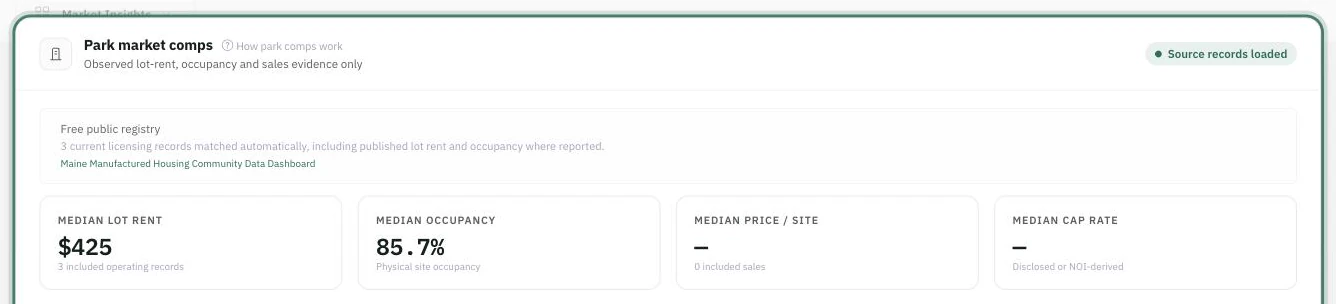
Park comps are their own evidence base. Apartment rent comps cannot price a pad, so Mogul Deal Evaluator stores park operating and sales records separately and shows them on a mobile home park deal under Market Insights → Park market comps. Everything on that card is an observed source record, and nothing on it changes your underwriting by itself.
Why apartment rents are not park comps
A two-bedroom apartment rent bundles the structure, the land, the roof, and usually the appliances. A lot rent buys the land, the roads, and the utility connections — the resident owns the home. The two numbers measure different products, respond to different supply, and sit at completely different levels. Substituting one for the other doesn't produce a rough estimate; it produces a wrong one. That is why apartment rent benchmarks are never used as pad-rent comparables, never converted into one, and never used to derive park rent growth or vacancy.
Two kinds of evidence
The card can show records from two very different sources, and it labels which is which on every row.
Free public registry records. For a park deal, Mogul Deal Evaluator automatically checks the supported government registries for records matching the deal's city or ZIP. Coverage is real but uneven — some states publish current licensing data with lot counts, occupancy and sometimes published lot rent; others do not. Where only the federal inventory has a record, it is shown as historical inventory and is deliberately limited: it carries no rent, occupancy, NOI or cap rate, and its rows are never marked verified.
Licensed comps you import. Exports you are authorized to use — park identity, site counts, lot rent and occupancy from an operating-data vendor; sale date, price, price per site, NOI and cap rate from a sales source. These are the records that make the sales tables useful at all.
Mogul Deal Evaluator does not bundle a paid park-data subscription, and there is no nationwide current park feed behind this card. When a market has no supported registry coverage and you have imported nothing, the honest answer is the one you get: "Park-specific comps are not available for this deal yet." Unsupported values stay blank rather than being estimated.
Reading the card
Every figure is an observed source record — the tiles name how many records each median rests on.
Four medians summarize whatever is loaded: Median lot rent, Median occupancy (physical site occupancy), Median price / site, and Median cap rate. Each tile names how many included records it is drawn from — a median over two comps is a very different claim than a median over twenty.
Below them, two tables carry the detail:
Park rent & occupancy comps — park, source and observation date, sites, occupancy, lot rent, home rent, utilities and mandatory fees, and a status.
Park sales comps — park, source and sale date, sites, sale price, price per site, cap rate, and a status.
Two habits pay for themselves here. First, read the date on every row: a record with no observation date says "Date not supplied" rather than pretending to be current, and a historical row is pilled as such. Second, read the utilities and fees column — a $350 lot rent with water and sewer included is not comparable to a $350 lot rent that bills both back.
Missing values show an em dash. A cap rate or a price per site may be calculated — from NOI and sale price, or from sale price and site count — and the table labels it when it is. Those calculations never invent a source fact that wasn't supplied.
Importing licensed comps
Owners and editors get an Import licensed park comps panel at the bottom of the card. Use exports you are licensed to use — do not scrape a vendor's site.
Choose the Data source: Datacomp / JLT, MHVillage, Crexi, MHC Database, State registry, or Manual / manager verification.
Choose the Comp type: Rent & occupancy or Park sales. This is the evidence type of the whole file.
Attach the Vendor export. The panel accepts CSV, XLS, XLSX or JSON — including the spreadsheets those vendors deliver.
Click Validate file. This reads the file and reports what it found without writing anything.
Review what came back, then click Confirm import. The confirmation is a separate, deliberate step — validating is never importing.
Every row needs a comp type and a way to identify the park (a property name or an address). A rent comp additionally needs a lot rent or an occupied-site count; a sale comp needs at least one of sale price, price per site, or cap rate. Useful optional columns include the observation or sale date, city/state/ZIP, distance, site counts, home rent, mandatory fees, utilities included, NOI, and your own notes. A cap rate may be written either way — 0.0575 or 5.75.
Applying evidence to your assumptions
Once rent comps are loaded, the park editors offer them where the matching number is entered — never behind your back:
In Edit inventory & rents, a Market median chip appears under Lot rent and under the Home-only portion, showing the median, the range, and the comp count. A Use $X button fills that one field, and you can edit it afterwards.
In the leasing plan, Use market evidence sets the new-lease rates from the same medians as a starting point.
The chip offered for the park-owned lot portion is explicitly a proxy: it is the same lot-rent benchmark, because a tenant-owned lot rent is the best available read on what the land is worth. It contains no home-only portion — set that yourself.
Where there is no evidence, the interface says Unavailable or No home-rent comps instead of offering a number. Home-rent comps in particular are scarce; expect to set the home-only portion from the actual leases more often than from comps.
Loading comps never rewrites your underwriting. Imported records are evidence for review; an assumption changes only when you click an apply button or type the number yourself. That is deliberate — a comp set is an argument about a market, not a fact about your park.
Before you rely on a comp
Scope — is it the whole park, or one phase? Are RV sites mixed in?
Utilities and fees — included, billed back, or sub-metered, and are mandatory fees on top?
Occupancy definition — occupied sites, licensed sites, or leased homes?
Date — and whether the source has published anything since.
Record what you concluded in Sources & rent evidence under Review park facts, so the reasoning travels with the deal instead of living in your head.
Common questions
"The card says no comps, but the market clearly has parks." — Coverage depends on what a registry publishes. Import a licensed export, or record the rents you verified directly with the manager.
"Why is a row marked historical?" — It came from the federal inventory fallback, which was last updated in 2022 and carries identity and site counts only.
"Can I use apartment rent comps as a sanity check?" — Not for lot rent. Use them for the market's income and demand picture, never as a pad-rent benchmark.
"I validated a file but nothing appeared." — Validation deliberately writes nothing. Return to the panel and click Confirm import.
mobile home parkMHPpark compslot rent compsprice per sitecap rateregistry