Underwrite a DealUpdated Sep 3, 2026Investors deciding what a deal can support
Maximum Purchase Price answers one question: "What is the highest price this scenario can pay while still clearing every buying target I selected?" It turns your own criteria into a price ceiling you can negotiate from.
Maximum Purchase Price is not an appraisal, a market valuation, or a recommended offer by itself. It is an investment ceiling: the most this deal supports under your selected targets and current scenario assumptions. What you actually offer is your decision.
Where it lives and how to run it
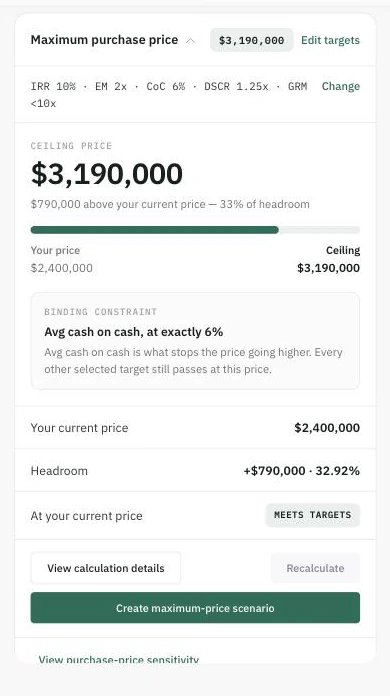
The card names the ceiling, the headroom, and — most usefully — which target stopped the price going higher.
Open the deal's Underwrite tab. The Maximum purchase price card sits in the Live Analysis rail — on multifamily, mobile home park and self-storage deals alike.
The card lists your available buying targets — the criteria you've set under Edit targets. Tick the ones this calculation must respect. A target you haven't defined simply isn't available; Mogul Deal Evaluator never substitutes a default for you.
Click Calculate maximum price.
Which targets it can solve against
The supported criteria come from your Buying Targets, each with a direction:
IRR, Equity Multiple, Avg Cash on Cash, and DSCR — the deal must meet or beat your target.
Gross Rent Multiplier — the deal must stay under your target (a lower GRM means a cheaper price per rent dollar).
How the answer is computed
Mogul Deal Evaluator runs a goal-seek through the same underwriting engine that powers the rest of the deal — no shortcut formula. It tests candidate prices, evaluates the full analysis at each one, and closes in on the highest price at which every selected target still passes, rounding the result down to a clean increment and re-verifying it. Because it uses your scenario's real assumptions, the ceiling is only as good as those assumptions.
Reading the result
Ceiling price — the answer, with your current price alongside and the headroom (or overage) between them.
Binding constraint — the target that stops the price going higher. That's the criterion your negotiation is really about.
Returns at the ceiling — each selected target's value at the maximum price, so you can see how tight each one is.
Staleness and the maximum-price scenario
The result is a snapshot of the assumptions it was computed from. If you change inputs afterward, the card tells you the figures are from the previous run and asks you to Recalculate — and scenario creation is disabled until you do. When the result is current, Create maximum-price scenario clones the scenario with the price set to the ceiling, through the same guarded path as any other scenario (your plan's scenario allowance applies), so you can study the deal at the ceiling without touching your base case.
When there's no result
No valid buying targets defined — set targets under Edit targets first.
No feasible price — even a very low price can't clear every selected target with the current assumptions. Loosen a target or revisit the assumptions; the deal is telling you something.
No ceiling — the selected targets don't bind price upward in this scenario's configuration, so no maximum exists to find.
maximum purchase priceprice ceilinggoal seekbinding constraintoffer