A share link makes a deal's report viewable by anyone who has the URL — no Mogul Deal Evaluator account needed. Nothing is ever shared until you explicitly enable a link, and you can always turn one off. This guide covers the full lifecycle.
Need to kill a link right now? Open the deal's share dialog (or the report's Sharing tab) and turn the link off. It stops working immediately — and disabling a link is never restricted by your plan: even if your subscription lapsed or no longer includes the features that created the link, you can always shut it off.
Enable and share
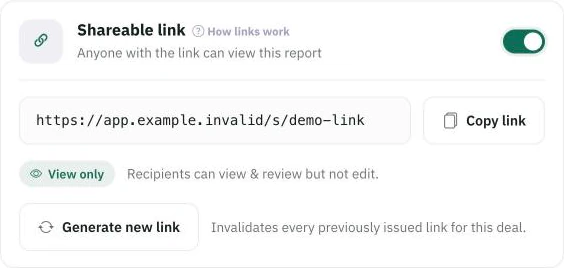
Once sharing is on, the whole lifecycle lives in one card: the URL to copy, the switch that revokes it, and Generate new link.
Open Share on the deal (or a report's Sharing controls in the Report Center).
Turn on the Shareable link — until you do, the report is private, even if a report exists. Creating a report never publishes anything by itself.
Copy link and send it. Recipients can view — never edit — and don't need an account.
Creating (or re-enabling) a deal's link is part of the standard reporting capability. What the link shows: for multifamily and self-storage deals, a link presents one scenario — the one you bound it to; Single Family links let you select which scenarios to include. Either way, check the selection before sending: the link shows the case you chose, at its current numbers.
Disable — and what re-enabling means
Turning the link off revokes access immediately: visits to the URL stop resolving to your report. The link isn't destroyed, though — if you enable sharing again later, the same URL comes back to life. That's deliberate: turning sharing off and on again is not a way to get a fresh URL, so a link you've already sent stays the one and only address for the deal. If you need a different URL, that's rotation.
Rotate — issue a new URL
Generate new link replaces the share URL: a brand-new link starts working and every previously issued link for the deal permanently stops — including older-format legacy links, which never come back after a rotation. Use it when a link escaped to the wrong audience but you still want to share with the right one. Rotation is a link-management action and requires the advanced reporting capability — distinct from disabling, which is always available.
Deal links and report links
Deal share link — the link from a deal's share dialog; presents the deal's report to the public.
Report share link (Report Center) — each saved report carries its own link with its own enable/disable/rotate controls, and honors that report's saved section selection server-side — a recipient can't tweak the URL to reveal more. Enabling a report's link also enables the deal-level share it depends on; disabling the report's link doesn't disturb the deal's other links.
Older links: links you shared under Mogul Deal Evaluator's earlier URL format keep working until you rotate — rotation retires them permanently.
What a recipient sees — and what happens if your plan lapses
Recipients see the report with your selected sections and public-facing notes; revoked, rotated-away, or invalid links all land on the same neutral "report unavailable" page, revealing nothing about the deal.
Links you already shared keep working after a downgrade or lapse — a recipient mid-conversation doesn't lose access because your billing changed. What a lapsed plan can't do is mint links for new deals or rotate; disabling always works.
Common mistakes to avoid
Assuming "off then on" made a new URL. It's the same link — rotate if you need a fresh one.
Sharing before checking the scenario. The link shows the case it's bound to.
Leaving old links live out of habit. If a conversation ended, turn the link off — you can always re-enable it.
share linkpublic linkrevokedisablerotatereport link